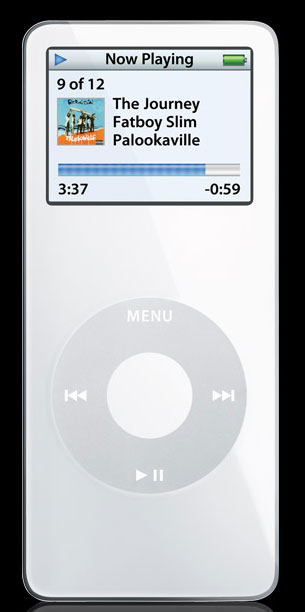
Shuffle Commercial

Apple Macintosh 1984 Superbowl Commercial

8:52 PM by Leigh Oliver 0 comments
I'd like to say I remember this ad, but I was only 3 and I'm sure I probably hadn't seen it till now.


Intel/Mac ad

8:52 PM by Leigh Oliver 0 comments
This is the Mac ad to advertise that they now have Intel chips.

Top 10 Widgets

5:25 PM by Leigh Oliver 0 comments
Google Dashboard Widgets
Google has released 3 widgets. Google search, Gmail and Blogger. If you use any of these 3 Google services on a regular basis then these widgets are for you!


2. Air Traffic Control
This widget enables you to scan the area for wireless networks, store network passwords in your keychain, Sort networks by feature and view current connection details including speed.


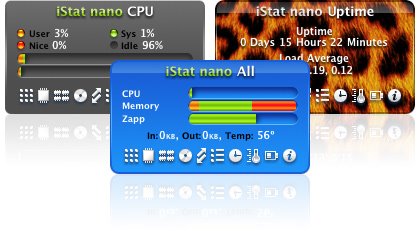
3. iStat Nano
Displays system information about your Mac such as memory usage, hard drives, IP and external IP, bandwidth, CPU temperature, battery, uptime and the top four processes.


4. SMS Widget
With this widget you can send text messages for FREE!!! Works with most US and Canadian phone carriers as well as some in
Europe.


5. Sudoku Widget
If you haven't heard of this latest craze then maybe you've been living in a cave. This game which originated in
Japan has taken the world by storm. It may even be more popular than the crossword puzzle.


6. Wikipedia Widget
A Dashboard widget for browsing Wikipedia. Search for articles and view them right from the Dashboard, complete with pictures and links.


7. Allrecipes.com
Easily search allrecipes site easily and get the recipe delivered straight to your dashboard.


8. Radar In Motion
With this widget you can view animated weather maps from around the world. Learn to predict the weather like a pro and your on your way to being the next local weather reporter!


9. Quick Time Full Screen
Enables you to watch QuickTime movies in full screen. There's no need to upgrade to the Pro version unless you want all the other cool features t comes with.


10. TV Tracker
Get TV listings on your dashboard with this cool widget. Search by Zipcode or by specific channel.

Shelf Appeal?

Would you still by an iPod if the box looked like this?

Top 10 Mac Downloads

Here's my "Top 10 List" of Mac Downloads that no Mac user should be without.

1. Skype.
This program allowes you to make voice calls for free over the internet to other Skype users. The sound quality is great provided you have a good net connection and you can even use text chat and send files. It supports OS X, Linux and Windows so you can communicate with everyone. But the best feature of this program is that you can make calls to Landlines and Cell phones accross the world at incredibly low prices. This is a 5 star program!!

www.skype.com

2. Firefox.
This is a great web browser that has been getting great reviews in magazines and on the web. It includes Tab browsing, Live Bookmarks, Google search bar, support for a wide range of web standards and a large range of add-ons that's continually growing. This is the best browser for the Mac by far.
(See link on left side of page)


3. Acquisition.
This P2P file sharing program is designed specifically for the make so you'll find nothing but Mac related content. While the days of P2P file sharing may be limited this program is still
http://www.acquisitionx.com/

4. OnyX.
This Mac maintenance program is a must for anyone who wants to take care of their Apple. It runs maintenance scripts and system scans, clean up system files and preform basic admin tasks. Not bad for a free program.
http://mac.softpedia.com/get/System-Utilities/OnyX.shtml

5. XinePlayer. going strong.
This media player will play Quicktime and other media files in full screen, so you don't need to pay for the full version of Quicktime. It also plays multi region DVD's so you no longer have to worry about which country you buy your movies from.
http://developer.berlios.de/project/showfiles.php?group_id=3329

6. Adium.
Adium is a free instant messaging application for Mac OS X that can connect to AIM, MSN, Jabber, Yahoo, Google Talk, ICQ and more.

http://www.adiumx.com/index.php

7. Deskfun.
Place pictures anywhere on your desktop, including in frames! Set the transperancy of individual pictures so they sit in the background or float above other applications.
http://www.furrysoft.de/?page=deskfun

8. iClock
This program includes an alarm, stopwatch and aplication switcher. It also allowes you to display multiple time zones, edit fonts and colors, and more.
http://www.scriptsoftware.com/iclock/iclockmac.php

9. Google Earth.
Googled earth allowes you to look at satelite imagery and maps from around the world. Check out cool locations like Hawaii and Paris and even your home town!
http://earth.google.com/

10. RealPlayer.
Listen to online radio, watch the news, see the latest movie previews and more! This is the ultimate online media player.
http://www.real.com/

Top 10 Things To Do With Your iPod

6:03 PM by Leigh Oliver 0 comments
Here's my 'Top 10 List' of things that you can do with your iPod.

1. Play Music.
This is the obviouse use for your iPod. I just thought I would remind you of it before you find out about all the other cool stuff you can do with your iPod and forget to use it for its intended purpose.

2. Learn Another Language.
Becaue you can listen to other languages on your iPod as well as changing the settings on it to display other languages it's a great tool to use in order to learn another language. Check out the In Flight range of audio books on the iTunes store to help you get started. You can also search for podcasts in other languages to help you brush up your skills.

3. Become A Master Chef.
By using the notes function on your iPod you can carry around all your favorite receipes. For help getting your favorite receipes on your iPod download the cool Connoisseur app from www.thelittleappfactory.com. There's also a couple of other cool apps to check out there.

4. Navigate The Subway.
If your going to the big city for the first time or your just a regular commuter who doesn't want to get lost then you need to check out iPod Subway Maps (www.ipodsubwaymaps.com). This site provides Subway maps for the major cities within America. There are also maps for cities all over the world such as Melbourne, Singapore, Tokyo, and London.

5. Listen To Your Emails On The Go.
If spend a lot of your time commuting or you just don't always have the time to sit down and read your emails, then listning to your emails on your iPod may be the answer. Ear mail can help you do this by converting your emails to audio files that you can then load on to your iPod. The program is available from the developers website (www.newton-eig.com) although the site is mostly in Japanese so it may be easier to get it from www.apple.com/downloads.

6. Learn an Instrument.
Talking Panda has developed a program called iRocker (www.talkingpanda.com) that allowes that can help you become a Rock Star! in no time. It includes a tuner, chord diagrams, metronome and jam sessions that let you play along to simple tunes.

7. Hold an iPod Church Service.
Not that I recomend replacing your local Church with your iPod but there are a few cool downloads available for those times when you sleep in on Sunday morning. www.sermonindex.com has a large range of MP3 sermons available to download and www.audiotreasure.com has hymnes and Audio scriptures. If you can handle reading the bible on your iPod screen then chech out http://biblepod.kainjow.com

8. Avoid Being "Clueless".
iPurseona (www.helmesinnovations.com) is a cool app that will give you hair and make up tips and much more. You can download the demo or pay just $9 for the full version.

9. Learn to Play Cards.
If you want to know the rules for card games including everything from Bridge to Poker then check out www.ipreppress.com/pages. If you want to increase your chances of winning at poker once you've learned the rules then you need Hold'em Dominator available at www.apple.com/downloads.

10. Load Linux.
Aside from just being something fun and interesting to do, Loading linux on your iPod opens up a world of possiblities. You can play games like Doom, Space invaders and old Nintendo games. It also allowes you to record audio at 96KHZ and play short videos. To find out more check out http://ipodlinux.org.